
Search is changing. And no, I’m not talking about some minor algorithm update.
I’m talking about a fundamental change in how consumers discover brands.
According to Bain & Company, 80% of consumers now rely on AI-generated answers for at least 40% of their searches. That’s not a trend. That’s a complete shift that is happening right now.
The real problem is…
Brands are losing control of their narrative. When someone asks ChatGPT, Perplexity, or Google’s AI Overview about your products, you’re not in control of the answer. Large language models decide what gets seen, what gets cited, and ultimately, what gets trusted.
And the scariest part is that you might not even know what they are saying about your brand.
Your brand could be invisible in AI search. Maybe incorrect or outdated information is shared about your brand. Maybe your competitor’s brand is getting cited, while yours is completely ignored. And if this continues, you’ll lose ground.
This is where Adobe LLM Optimizer comes in.
In this guide, you’ll learn:
- What Adobe LLM Optimizer is and why it matters for brand visibility
- Core features that set it apart from typical AI SEO tools
- How Adobe LLM Optimizer works
- Pricing structure and who should invest
- Real results from brands already using the platform
Let’s go into detail!
What Is Adobe LLM Optimizer?
Adobe LLM Optimizer is an enterprise AI SEO tool built specifically for generative engine optimization (GEO). The platform launched in October 2025 and is now generally available. It tracks your brand’s presence across five major LLMs like ChatGPT, Gemini, Copilot, Perplexity, and Google AI Overviews.
It monitors how AI agents interact with your site and provides prescriptive recommendations to improve your AI visibility. It tells you what kind of user’s search intent is showing your website or brand on different AI tools.
Here’s what makes it different: Adobe LLM Optimizer doesn’t just track visibility. It also identifies when an LLM is hallucinating or providing incorrect data about your products by mapping answers back to your ‘Source of Truth’ (website, official materials, etc.).
This means you can catch and correct misinformation before it shapes customer perception.
What Makes Adobe LLM Optimizer Different From Other AI SEO Tools
Most AI SEO tools stop at monitoring. They’ll tell you whether your brand was mentioned in an AI-generated answer. Some will even show you sentiment analysis. But that’s where they end.
The LLM Optimizer goes further. It uses agentic traffic analysis through Content Delivery Network (CDN) log data to detect how AI agents are actually crawling your site. This is important to know because AI agents behave completely differently from human visitors.
While human visitors enter through your homepage, AI agents enter through deep content such as FAQs, help docs, and blog posts. They’re looking for specific information to answer user queries, and most analytics tools can’t even see this traffic.
Adobe LLM Optimizer surfaces this ‘invisible’ bot traffic, showing you exactly which pages shape AI answers about your brand.
Then comes deployment. The platform combines insights with execution. Instead of handing you a report and wishing you luck, it provides one-click deployment for technical fixes through the CDN layer.
This means your marketing team can implement optimizations without waiting months for the IT department to update the website’s source code.
Now, you are clear about what exactly this tool is. Let’s talk about the key features of this tool.
Core Features of Adobe LLM Optimizer for Brand Visibility
The platform is built around various key capabilities, but it has 3 main pillars: Brand Presence Intelligence, Agentic & Referral Traffic Insights, and Optimization recommendations.
Now let’s go through its key features and what each one does.
1. Brand Presence Intelligence
This feature gives you a unified view of how your brand’s presence shows up across five major AI search engines and regions. With the help of this tool you can track:
- Brand mentions across all product categories
- Number of times your website has been cited and the context
- Sentiment analysis
- Competitive benchmarking
The competitive angle is very useful. This helps you see how your competitor brands appear alongside yours. It helps you understand where competitors are gaining visibility, and it helps in identifying gaps in your own AI search visibility.
Here’s a screenshot that shows how you can see the brand presence in the Adobe LLM dashboard:
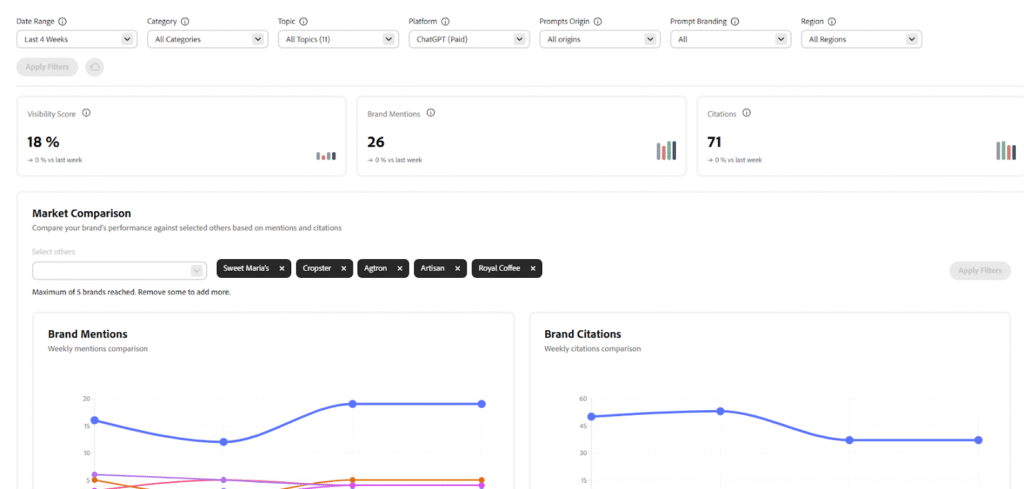
This matters because AI search is a zero-sum game. If a competitor’s website gets cited instead of yours, that’s a lost opportunity.
2. Agentic Traffic Insights (Key Differentiator)
This is where Adobe LLM Optimizer really separates itself from other AI SEO tools.
Agentic traffic refers to how AI agents and bots access your site to gain information. AI agents choose specific content to answer queries, unlike a human visitor who browses, clicks, and goes through your content pages.
The platform uses CDN logs to detect this behavior. Traditional analytics tools like Google Analytics can’t see most of this traffic because bots don’t execute JavaScript the same way humans do. But LLM Optimizer captures it at the CDN level, showing you:
- Which pages AI agents are accessing the most
- When they’re crawling your content
- What content they’re using to build AI answers
- Whether they’re blocked or have limited access
Here’s an example showing how agentic traffic is spread across different markets, categories, and page types:
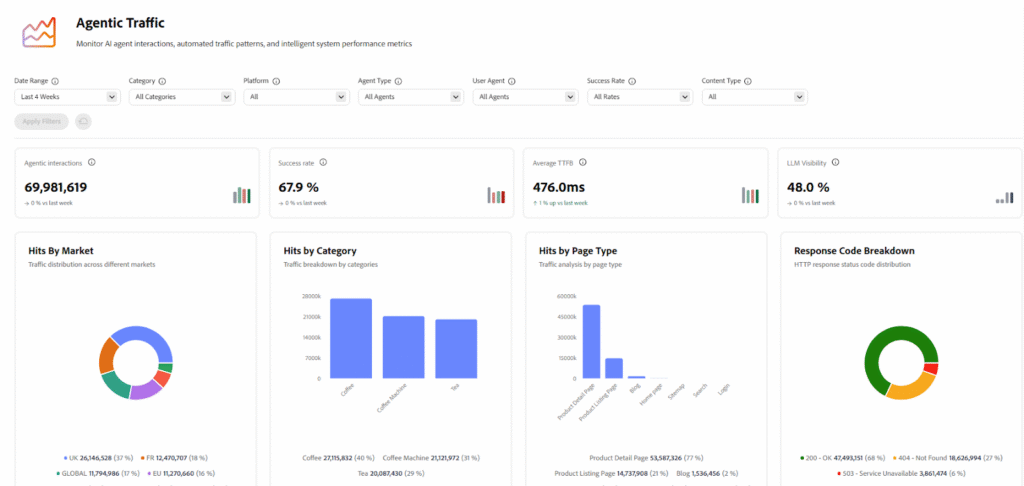
This data is gold. It tells you exactly which assets influence how AI platforms represent your brand. With this data, you can find out on which market AI agents are focusing the most, what type of pages AI agents are accessing frequently. It also shows what content type or product attracts the most AI agents’ attention.
If your FAQs are heavily accessed but your product pages aren’t, that’s a signal. There are many AI tools that can’t read complex pages, so if bots find a page that is complex, they pass it, which means you’re losing citations.
3. Referral Traffic & ROI Measurement
It’s one thing to know your brand is mentioned in AI search results. It’s another to prove it drives business impact.
Adobe LLM Optimizer tracks referral traffic from AI-generated answers. When someone clicks through from a ChatGPT response or a Google AI Overview, the platform captures that session and connects it to downstream outcomes like conversions and revenue.
Let’s look at the example where you can see how visitors arrive at your site from external platforms, referral links, and AI citations:
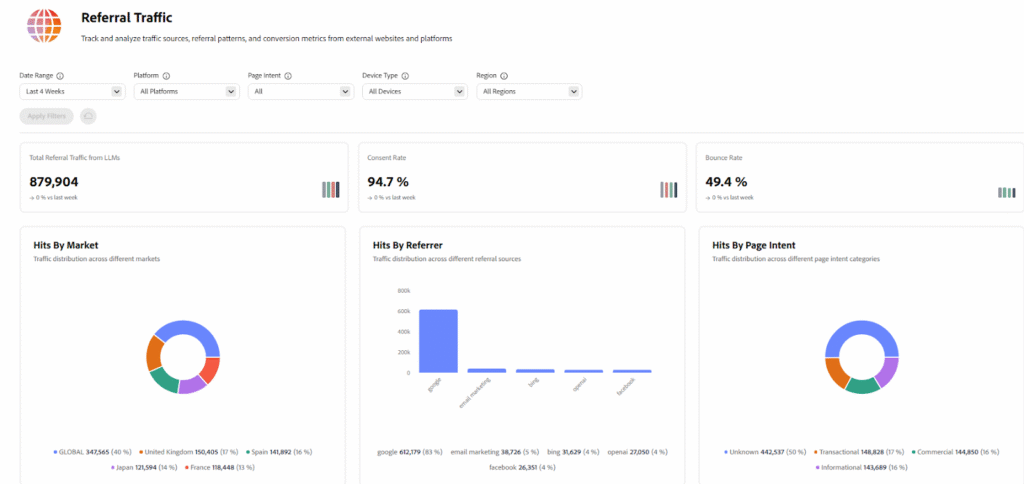
The platform also uses CDN-side tracking to ensure that even if a user’s browser blocks standard tracking cookies, Adobe can still attribute that “Agentic referral” to a session.
Post-GA, the platform is roadmap-aligned to integrate with Adobe Analytics (AA) and Customer Journey Analytics (CJA). This will allow businesses to connect changes in AI visibility to other marketing channels and measure true attribution across the customer journey.
4. Optimization Engine
This is where insights become action. The platform automatically identifies issues that are affecting your AI visibility, and it suggests you with specific fixes. Such as what the issue is, why it is important for AI models, and how you can fix it.
Here’s an example where you can see how the tool has mentioned optimization opportunities based on your performance data and trending topic:
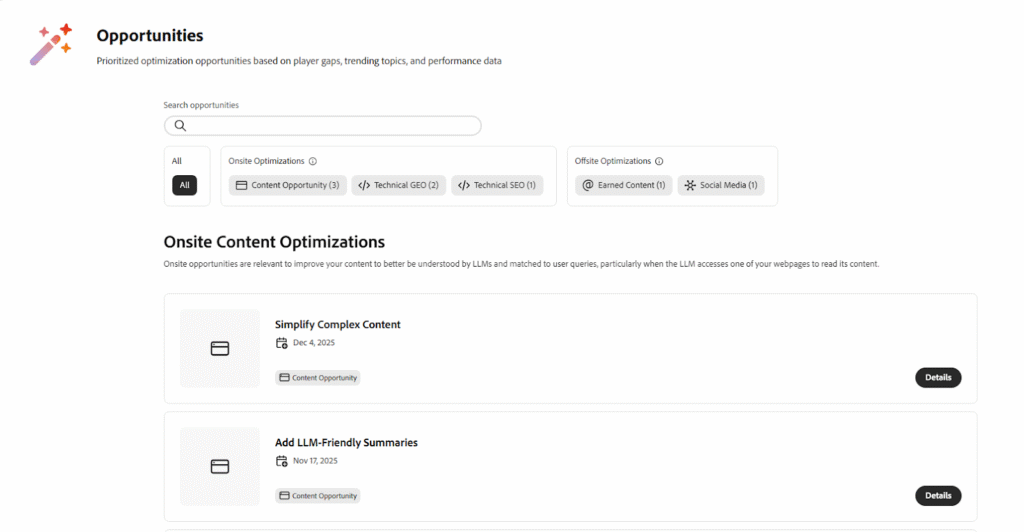
Common optimizations include:
On-site Optimization: There are so many websites that use complex code, such as (Javascript). This might look good for human visitors, but when it comes to AI bots, it’s difficult for them to comprehend, as LLMs only understand “HTML” structures.
So, what Adobe LLM Optimizer does is it “pre-renders” these pages, which basically creates a simplified version that the AI can easily read and cite.
Sometimes, there’s a broken link, and it shows 404 errors to the AI models. So, the LLM optimizer tool fixes this issue by redirecting bots to a different page.
There are also multiple websites, where a file called robots.txt might tell the AI tools that they are not allowed to enter. But the Adobe optimizer tool makes sure all the doors are opened for friendly AI crawlers.
Offsite Optimization: LLM optimizer helps in adding structured FAQs. As AI tracker tools love direct questions and answers.
If your content is very long, it will suggest adding a summary block. This gives the AI tools a quick “tl;dr” (too long; didn’t read) version of your page to use in its answers.
If you have duplicate or empty headings and meta descriptions, it fixes that. This lets AI tools easily navigate and gather information.
What’s powerful here is deployment. Many optimizations can be implemented with one click through the CDN layer. This is huge for marketing teams who would otherwise need to submit tickets to engineering and wait weeks (or months) for changes to go live.
Now, you might be wondering. How this tool actually works, so let’s not waste your time and get into that quickly.
How Adobe LLM Optimizer Works (End-to-End Workflow)
Understanding how the platform actually works helps you get the most value from it. Here’s the end-to-end workflow:
Step 1: Prompt-Based Monitoring (The New ‘Keywords’)
Unlike traditional SEO, where you track keywords, generative engine optimization revolves around prompts. These prompts are the questions customers ask AI assistants.
You define the prompts that matter to your business. These might be:
- Product-focused: ‘What’s the best CRM for small businesses?’
- Service-focused: ‘How do I optimize my website for AI search?’
- Brand reputation: ‘Is [Your Company] reliable?’
Adobe LLM Optimizer then queries multiple AI models with these prompts and analyzes the responses. You see exactly how your brand is (or isn’t) represented in each answer.
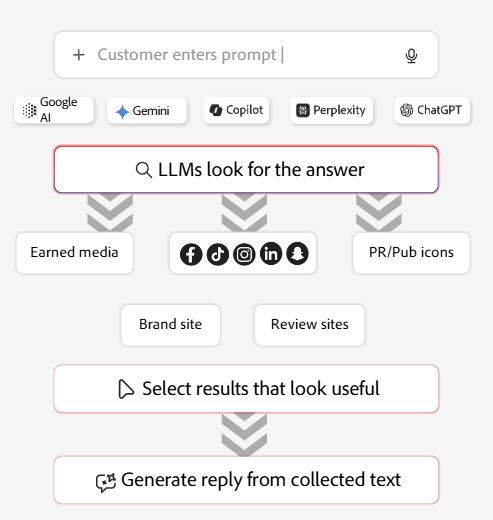
Step 2: Multi-LLM Brand Presence Analysis
The platform tracks your brand visibility across five major LLMs and multiple regions. For each prompt, you’ll see
- whether your brand was mentioned or not,
- how you were cited or if you were not,
- why you were mentioned, and
- whether your competitor was present in the same response or not.
This competitive view is really important. This helps you in finding out your performance against rivals and identify topics where they’re winning citations.
Step 3: Agentic Traffic & Referral Traffic Insights
Now you understand what AI agents are seeing when they crawl your site.
Agentic traffic shows which pages bots access, how often, and whether they can actually read the content. Many sites have JavaScript-rendered content that looks perfect to humans but appears completely blank to AI agents. This is a huge blind spot.
Referral traffic, on the other hand, tracks real users who clicked through from an AI-generated answer to your site. This is where you can prove ROI.
Step 4: Prescriptive Optimization Recommendations
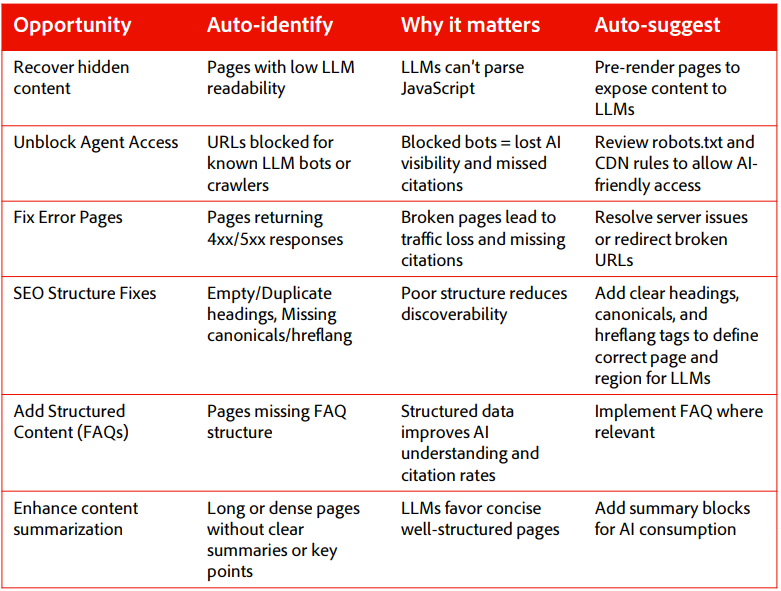
Based on the insights gathered, the Adobe LLM Optimizer tool generates specific recommendations. These aren’t vague suggestions like ‘improve your content quality.’
Here’s a table showing a few examples of how the tool recommends actionable fixes for your brand:
Step 5: Edge-Based Optimization
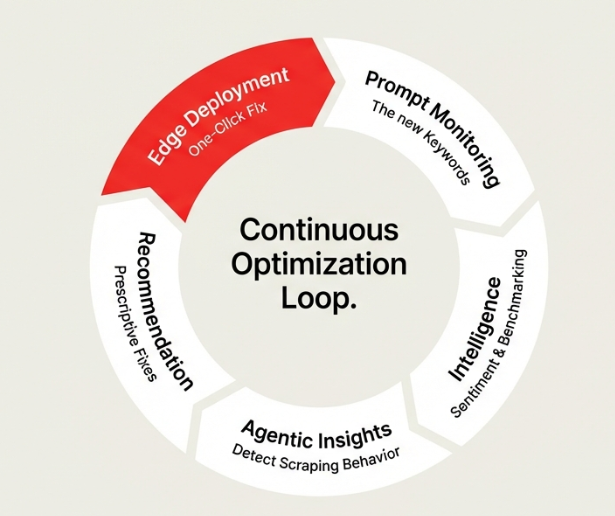
Here’s where Adobe LLM Optimizer is really unbeatable. Optimizations happen at the CDN layer, not in your website’s source code.
What does this mean? Your marketing team can fix bot-visibility issues without waiting for engineering.
For example, if AI agents can’t read your JavaScript-heavy product pages, Adobe LLM Optimizer can pre-render those pages at the edge. Bots see fully assembled HTML. Humans still get the dynamic, JavaScript-powered experience.
This edge-based approach is low-risk and doesn’t affect your site’s performance for real users. Once deployed, the platform continuously monitors visibility changes and connects them to downstream impact.
So, I think you’re clear about how it works. Let’s get into the advantages and see how your brand can benefit from this tool.
Advantages of Adobe LLM Optimizer
Now that you know how Adobe LLM Optimizer, an AI visibility checker tool, works. It is important to know what makes this platform worth considering.
So, let’s go through the advantages one by one.
1. Enhanced Brand Visibility and Share-of-Voice
The platform moves brands from simple rankings to “relevance,” ensuring they are surfaced and cited by major LLMs like ChatGPT, Gemini, Claude, Copilot, and Perplexity.
By using Generative Engine Optimization (GEO) scores, marketers can track how these models position their brand to high-intent audiences and identify where competitors might be gaining an edge.
Plus, brands can see significant jumps in authority; for example, the brand Frescopa increased its citations by 5x within a single week.
2. Deep Insights into “Agentic” Traffic
A major shift in digital discovery is that while humans usually visit a site through the homepage, AI bots (or “agents”) tend to enter through deep content like FAQs, documentation, and help articles.
Adobe LLM Optimizer uses CDN log analysis to surface this “agentic traffic,” revealing exactly how bots are interacting with your site. This allows you to identify which specific assets, like a blog post or a technical guide, are actually the most influential in shaping how an LLM represents your brand to the world.
3. Automated and Prescriptive Optimizations
The platform is designed to move teams past the “analysis paralysis” of data by following a three-step framework: Auto-identify, Auto-suggest, and Auto-optimize.
It doesn’t just point out problems; it provides prescriptive recommendations to fix them, such as unblocking agent access in your robots.txt file or resolving 4xx/5xx error pages that cause lost citations.
One of its most powerful technical features is the ability to pre-render JavaScript-heavy pages, making dynamic content visible to AI agents without changing the experience for your human visitors. Best of all, these fixes can often be deployed with a single click via Adobe Experience Manager or custom APIs.
4. Brand Protection and Accuracy
One of the biggest anxieties for modern brands is the risk of AI-generated misinformation. The platform offers a critical safety net by mapping AI-generated answers back to your official source content, allowing you to pinpoint and correct “hallucinations” before they damage your reputation.
Additionally, it provides a unified view of brand sentiment across different regions and models, giving PR and communications leads the tools they need to ensure their brand story remains accurate and trustworthy.
5. Measurable ROI and Business Growth
With projections suggesting a 50% decrease in organic search traffic by 2028, being able to prove the value of AI visibility is no longer optional. The platform helps you prioritize work by calculating the projected traffic value in dollars, showing exactly what those AI citations are worth to your bottom line.
Furthermore, through integrations with Adobe Analytics and Customer Journey Analytics (CJA), you can connect AI discovery directly to downstream outcomes like conversions and revenue, giving you a clear picture of your total ROI.
6. Enterprise-Grade Flexibility
Adobe has built this as a standalone SaaS platform, meaning you do not need to use Adobe Experience Manager (AEM) to take advantage of it; it integrates into any custom CMS via APIs. It is built for the complex needs of large organizations, using secure standards like the Model Context Protocol (MCP) and Agent2Agent (A2A) for ecosystem integration.
The pricing model is also straightforward and scalable, based on the number of “prompts” (the AI equivalent of keywords) you wish to monitor, starting with a minimum tier of 1,000 prompts.
Now, you know what we’re going to cover next. Obviously, it also has a few disadvantages like any other tool.
Disadvantages of Adobe LLM Optimizer
No platform is perfect, and the Adobe LLM AI checker tool also has a few limitations that you should know before signing a contract.
Let’s be honest about where this platform falls short and when it might not be the right fit.
1. High Entry Price for Smaller Businesses
The $115,000 minimum annual commitment is a real barrier. If you’re a small business or a startup trying to gain AI visibility, this pricing puts Adobe LLM Optimizer completely out of reach.
Even for mid-market companies, the cost can be tough to justify, especially when you’re still figuring out whether AI search will actually impact your bottom line. The platform is clearly designed for enterprises with significant marketing budgets.
If you’re under $10M in annual revenue, you should probably start with lighter AI visibility tools. Get a baseline understanding of how you appear in AI-generated answers, then revisit enterprise solutions when the data justifies the investment.
2. Prompt-Based Pricing Requires Careful Planning
Estimating how many prompts you need isn’t straightforward. Unlike traditional SEO, where you can track thousands of keywords relatively cheaply, each prompt in Adobe LLM Optimizer costs real money.
You’ll need to be strategic about which prompts to monitor. Do you track every product variation? Every market? Every competitor comparison? The costs add up quickly. This means you can’t just ‘see what happens’ with a broad monitoring approach. You need a clear plan.
Plus, as your business grows and you launch new products or expand into new markets, your prompt needs will increase. Budgeting for this growth can be tricky.
3. Best Value Requires Strong Content Foundation
Adobe LLM Optimizer can’t create helpful content for you. It can identify what’s missing and where you’re losing citations, but you still need to do the work of creating content that AI models want to cite.
If your current content is thin, outdated, or poorly structured, fixing technical issues won’t suddenly make you appear in AI search results. You’ll get the most value from this platform if you already have decent content that just needs technical optimization and better discoverability.
Think of it this way: Adobe LLM Optimizer is like hiring a really good distributor for your products. But if your products aren’t good to begin with, distribution won’t save you.
4. Emerging Category with Evolving Best Practices
Generative engine optimization is new. The field emerged in 2023, and best practices are still being figured out. What works today might not work in six months as AI models evolve.
Adobe is betting heavily on this space, but there’s no 20-year playbook like there is for search engine optimization. You’re essentially investing in a category that’s still being defined. That comes with risk.
The platform will need to adapt quickly as AI platforms change their crawling behavior, citation logic, and ranking algorithms. Adobe has committed to regular updates, but you’re still early to a space that’s moving fast.
When Adobe LLM Optimizer May Not Be the Right Fit
This platform isn’t for everyone. Here’s when you should look elsewhere:
- You’re a small business or startup with a limited marketing budget. The minimum investment is too high to justify at your stage.
- You don’t rely on organic search for customer acquisition. If most of your traffic comes from paid ads, direct, or referral, AI visibility won’t move the needle much.
- Your content foundation is weak. Optimize the content creation process first, then optimize for AI agents.
- You operate in a niche with low search volume. If people aren’t asking AI assistants about your category yet, the ROI won’t be there.
- You want quick experimentation. The platform requires an annual commitment. If you want to test and learn cheaply, start with lighter AI tools.
For businesses in these situations, consider starting with monitoring-only tools that cost a fraction of what Adobe LLM Optimizer does. Build your case with data, then upgrade when the numbers justify enterprise investment.
Challenge: Getting Buy-in from Leadership
Even if you’re convinced Adobe LLM Optimizer is worth the investment, convincing your CFO or CMO is another challenge entirely.
Here’s how to build a business case:
Show competitive analysis: Document where competitors are appearing in AI-generated answers, and you’re not. Make it clear that this isn’t theoretical; you’re losing market share right now.
Demonstrate early wins: If Adobe offers a ‘Try Before Buy’ program, use it. Show leadership what a 5x increase in citations could mean for traffic and revenue.
Project ROI clearly: If you currently get X traffic from organic search, and according to Gartner, traffic will decline 50% by 2028, what does that cost in lost revenue? Frame Adobe LLM Optimizer as insurance against decline rather than a nice-to-have.
The reality is that many executives still don’t fully understand AI search. You’ll need to educate them on why this matters before asking for six figures.
So, now that you are fully aware of its challenges. You might be thinking if you should get this tool or not. So, let’s clear that for you as well.
Who Can Use Adobe LLM Optimizer for AI Visibility?
Adobe LLM Optimizer is designed for enterprise brands, typically those with $100M+ in annual revenue. But let’s break down the specific personas and industries that benefit most.
- CMOs and Heads of Marketing who are seeing declining organic traffic and need to understand how their brand appears in AI search.
- Chief Communications and PR leaders concerned about brand reputation management in AI-generated answers.
- SEO and GEO specialists tasked with adapting to AI search engines.
- Digital marketing managers responsible for content creation and optimization.
Industries That Benefit Most
1. B2B industries where buying journeys are research-driven: SaaS companies, IT services, financial services, and healthcare solutions. These industries rely heavily on helpful content that answers specific questions. AI search is exactly where prospects start their research.
2. B2C industries that depend on search discovery: Retail, e-commerce, travel, hospitality, and CPG brands. If customers find you through organic search results, you need to show up in AI search results.
I know, I know what you are thinking. “How will I know if this actually works?” “Where is the proof?”
Well, here’s the real-world result that will show you Adobe LLMs Optimizer’s performance.
Real-World Results & Use Cases of Adobe LLM Optimizer
Let’s look at actual results from brands using the platform.
Frescopa itself is a great example.
The problem: AI agents were unable to access the brand’s dynamic content, like product descriptions, ratings, and reviews. This limited their visibility in AI-generated answers.
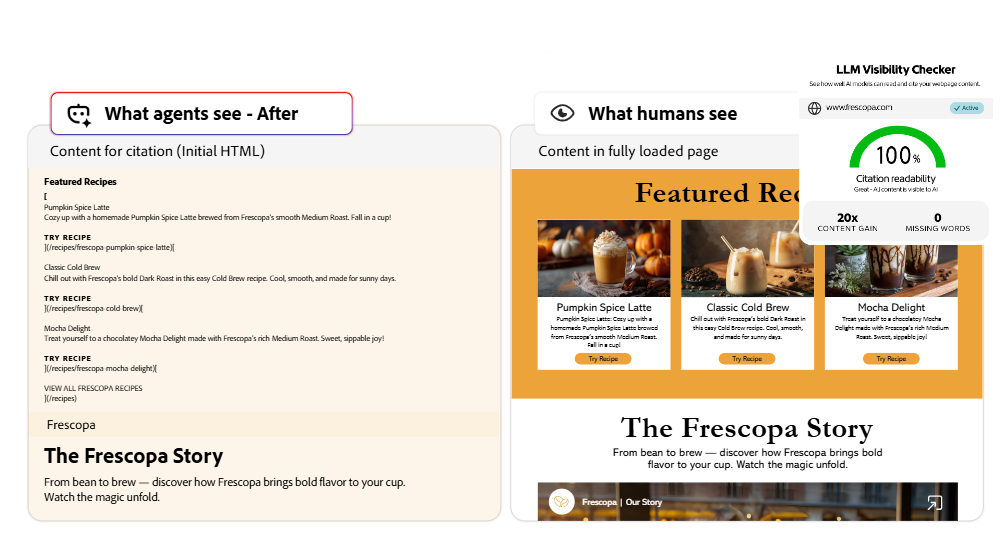
Here’s an example showing LLM visibility with AI optimization:
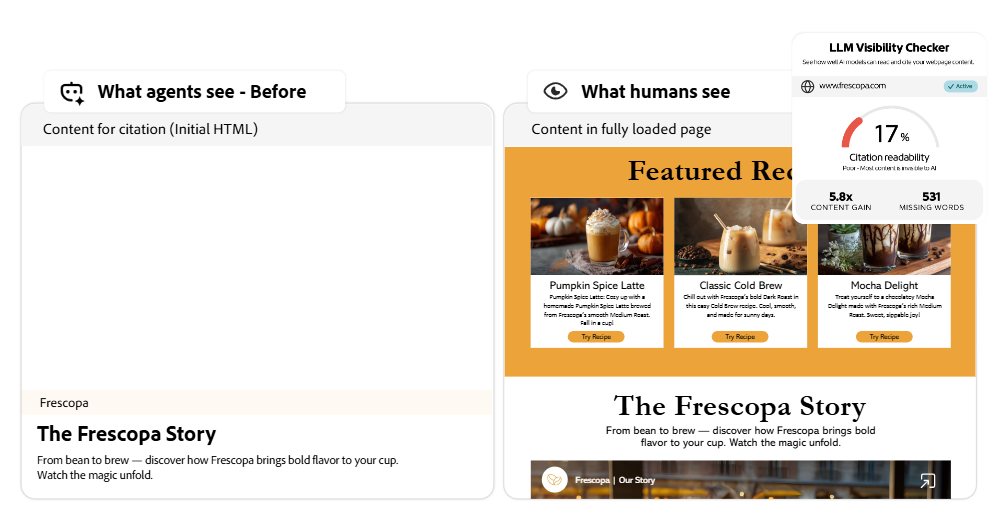
The solution: They implemented edge-based optimization to pre-assemble content for AI agents. Bot-only delivery ensured human visitors remained unaffected. The deployment was zero-code, happening entirely through the CDN layer.
The outcome: Citations increased by 5x within one week of optimization. That’s a 500% increase.
According to Adobe Analytics data, retail sites saw a 4,700% increase in traffic from generative AI sources in July 2025 compared to July 2024. This isn’t a future trend. It’s happening now.
Now, you have seen the real example. And I’m sure you’re thinking that everything looks good. This tool is doing a lot of things and giving results. It might cost a fortune.
Well, not fortune! But let’s see how much exactly it costs?
How Much Does Adobe LLM Optimizer Cost?
Adobe LLM Optimizer is positioned as an enterprise-grade solution and is priced accordingly. This is not a low-cost or mid-market tool. It is designed for large organizations with significant scale and budget.
Adobe LLM Optimizer uses a prompt-based pricing model. The minimum annual commitment is 1,000 prompts at a price of approx. $115,000. Prompts are purchased in increments of 200, and pricing is tiered, with lower per-prompt costs at higher volumes.
Estimating Your Prompt Requirements
Prompt volume depends on how many markets, products, and topics you need to monitor. A simple way to estimate demand is:
Markets × Products × Topics per Product = Total Prompts
Suppose you are a furniture retailer operating in Canada and Norway. You have 12 key furniture lines (Products) and need to track 10 unique buying triggers (Topics) for each, such as material durability, shipping speeds, or carbon footprint.
- 2 markets × 12 products = 24 total product-market combinations
- 24 combinations × 10 topics = 240 total prompts
When scaled to include your seasonal collections and competitive analysis in both regions, you would need approximately 5,000 prompts annually to ensure complete visibility.
At the $110 per prompt tier, the annual cost would be: $110 × 5,000 = $550,000 annually.
Is the Investment Worth It?
The answer depends on your business size and reliance on organic search visibility.
For companies generating over $100 million in annual revenue, where search is a major acquisition channel, losing visibility in AI-driven search results can cause the loss of millions in revenue. In that context, a $550,000 annual investment functions as risk mitigation.
For smaller businesses and early-stage companies, this solution is likely not a fit. The cost is difficult to justify without enterprise-scale exposure. Lower-cost AI visibility and monitoring tools can provide sufficient insight at this stage and should be considered first.
Mid-market organizations in the $10 million to $100 million revenue range may benefit from a phased approach. Using a more affordable AI-powered SEO or visibility tool for several months can help establish a baseline, track competitor movement, and quantify the potential impact before committing to enterprise pricing.
Now that we have covered everything, let’s see what we will get with this tool in the future.
What Feature Enhancement is Expected in Adobe LLM Optimizer
The future of Adobe LLM Optimizer is focused on moving from simple monitoring to deep business integration. Here are 4 specific enhancements currently on the horizon:
1. Full Revenue Attribution via Adobe Analytics (AA) & CJA
The most significant roadmap milestone is the post-launch integration with Adobe Analytics (AA) and Customer Journey Analytics (CJA). Currently, marketers can see AI visibility, but this update will allow you to:
- Connect AI mentions to dollars: See exactly how a citation in ChatGPT leads to a conversion on your site.
- Downstream outcomes: Track the full journey from “AI-assisted discovery” to a final purchase, proving the true ROI of your GEO efforts.
2. Advanced “Agentic Experience” Readiness
As AI moves from answering questions to completing tasks (booking, ordering, etc.), Adobe is evolving its Edge-based delivery. Future updates will help brands structure their technical data so that AI agents don’t just “read” the site, but can interact with it. They can understand real-time pricing and inventory for direct task execution.
3. Expanded Sentiment and Accuracy Mapping
The roadmap includes more granular tools for misinformation correction. The platform will go deeper into mapping AI responses back to a brand’s specific “Source of Truth” documents. This ensures that as LLMs become more conversational, they remain anchored to your approved brand facts rather than old or incorrect data found elsewhere on the web.
4. Ecosystem Integration (Experience Cloud)
While the tool remains a standalone product that does not require AEM, the roadmap includes deeper “Better Together” workflows across the Adobe Experience Cloud. This means optimizations identified by the LLM Optimizer can eventually trigger content updates or “Brand Concierge” conversational experiences automatically.
Quick Recap
AI search is no longer experimental. It’s here, and it’s changing how customers discover brands.
If you’re an enterprise brand, losing AI visibility means losing market share. Citations, sentiment, and accuracy matter more than Google rankings because they directly shape customer perception before anyone even visits your site.
Adobe LLM Optimizer offers one of the most complete enterprise solutions available today. It combines deep visibility into how AI agents access your content, prescriptive recommendations on how to fix issues, and low-risk deployment through the CDN layer.
If you’re ready to invest, start with visibility measurement. Understand where you stand today. Then fix agent readability issues. Finally, scale with structured content and continuous monitoring.
For ongoing AI visibility tracking and faster iteration, consider pairing enterprise insights with lighter tools that allow you to test and learn quickly.
The shift to AI search is happening whether you’re ready or not. The question is: will your brand be part of the answer? Talk to the AI SEO experts for FREE to get all the answers related to your brand’s AI visibility.
FAQs
Does Adobe LLM Optimizer require other Adobe products?
No. Adobe LLM works independently and does not require AEM or any other Adobe product. Although using other tools by Adobe can complement existing stacks when needed.
What does the Adobe LLM Optimizer do?
It shows how a brand appears in AI-generated answers and identifies technical and content gaps that affect AI-driven traffic and visibility in AI search.
What LLM does Adobe use?
Adobe LLM Optimizer does not rely on a single model. It analyzes how multiple large language models interpret and cite brand content rather than generating answers itself.
How to optimize LLM performance?
Optimizing LLM performance focuses on clear structure, readable markup, and consistent writing style, ensuring AI systems can accurately extract and summarize content.
How is this different from traditional SEO tools?
Unlike traditional tools focused on rankings and keywords, AI seo optimization with Adobe LLM Optimizer measures how AI systems consume long-form content and surface it in AI-powered responses, typically available through a paid plan.
How much does Adobe LLM Optimizer cost?
Minimum investment is $115,000 per year for 1,000 prompts. Pricing scales with volume at higher tiers; the per-prompt cost decreases. Your specific cost will depend on how many markets, product categories, and topics you need to track.
Resources: