Most Amazon shoppers never click past the first page of search results.
That means if your product isn’t showing up early, it’s practically invisible.
With thousands of competitors and slow-moving organic rankings, it’s easy for new sellers to get buried.
And if shoppers don’t see your product on Amazon, they won’t buy it.
So, how do you make sure your listing stands out and gets the attention it deserves?
That’s exactly why so many beginners start by asking what is Amazon PPC and how it can help.
This Amazon PPC guide will help you understand what it is and how it works. Along with that, we’ll discuss a few Amazon PPC strategies to increase your product’s visibility even in the most competitive categories.
Let’s start.
What is Amazon PPC?
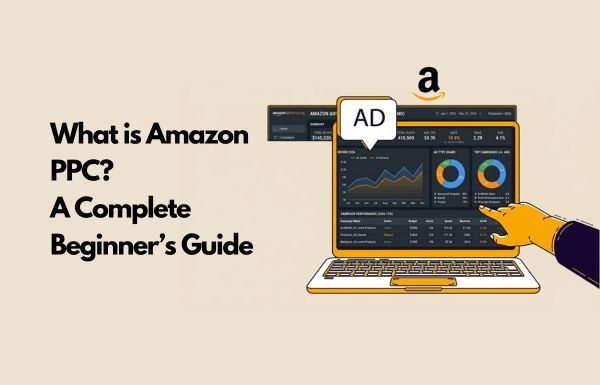
Amazon PPC (Pay-Per-Click) is Amazon’s advertising platform where sellers pay a fee each time a customer clicks on their product ad.
It’s a form of online advertising where advertisers bid on keywords, and their ads appear in search results and competitor product pages. This helps sellers drive sales and build brand awareness by showcasing their products to shoppers actively searching for similar items.
And the best part?
You only pay when someone clicks, making it one of the most efficient ways to grow your store, especially when you’re just starting out.
That brings us to the next big question on how does Amazon PPC actually work behind the scenes to get your product noticed?
Understanding what is Amazon PPC mechanically will help you leverage it better.
How Amazon PPC Works?
To really understand the power of what is Amazon PPC, you need to understand how the system works behind the scenes. At its core, Amazon PPC (Pay-Per-Click) runs on a simple but powerful model: you only pay when someone clicks on your ad.
But what happens before that click is where things get interesting when learning what is Amazon PPC.
# The Pay-Per-Click Model (PPC)
Running Amazon ads as a beginner is the time when you are not paying for impressions (how many people see your ad), but are paying for clicks that actually grab your shopper’s attention.
So, even if thousands of people see your ad but no one clicks, you don’t get charged a cent. This makes it a smart way to test keywords, understand demand, and drive traffic without burning through your budget.
This is a fundamental aspect of what is Amazon PPC.
# The Auction and Bidding System
Now, this is where knowing what Amazon PPC is and how to use it effectively becomes important.
Amazon PPC works like a live auction that runs every time someone types a keyword into the search bar.
Sellers “bid” on keywords they think shoppers will use to find their products.
The higher your bid and the more relevant your product is, the more likely your ad show up in a prime spot.
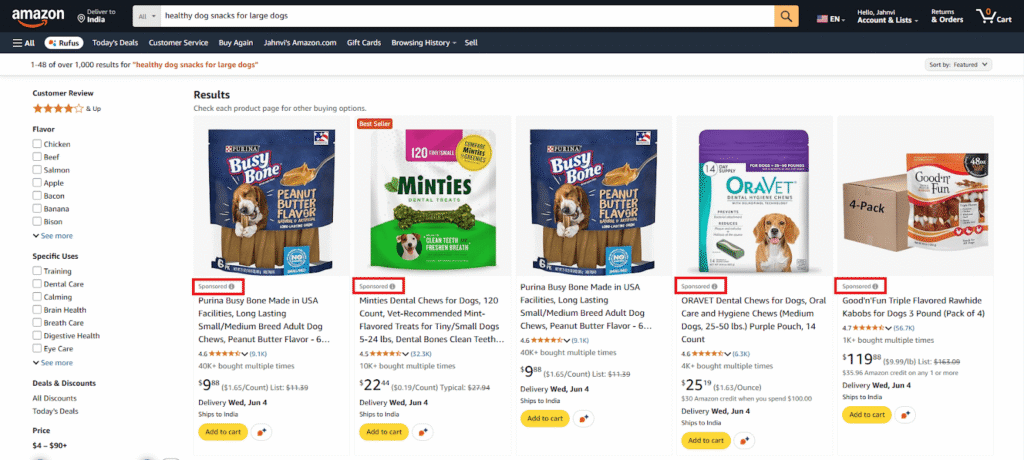
For example, if you sell organic dog treats and bid on the keyword “healthy dog snacks,” your ad could show up right at the top if your bid is competitive and your product listing is relevant and well-optimized.
But here’s the catch: Amazon doesn’t just give the top spot to the highest bidder.
It also considers how likely your product is to convert.
That means better product listings often win, even with lower bids.
# Where Amazon Ads Show Up?
Amazon offers a few different ad placements that help you get discovered, which is essential when learning what is Amazon PPC:
Top of Search Results: These are the sponsored products you see at the very top of page one.
They look almost like regular listings but are marked with a subtle “Sponsored” tag.
These spots are really valuable because they’re where most shoppers click first.
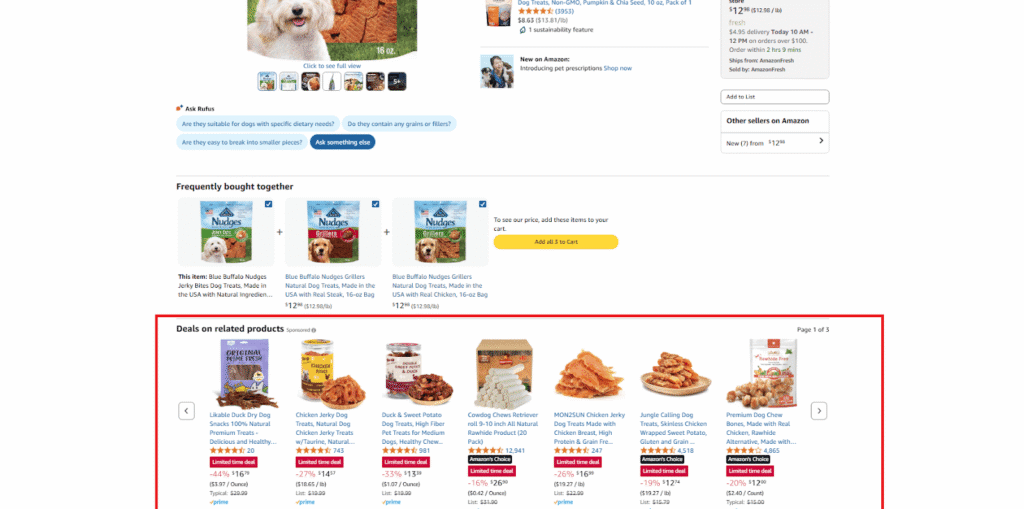
Product Detail Pages: Your ad can also show up on competitor listings, under the “Sponsored Products related to this item” section.
This is a great way to capture shoppers who are already in buying mode.
Search Results (Middle or Bottom): If your bid or relevancy score isn’t quite high enough for top placement, your ad might still appear mid-page or at the bottom of the search results.
Using different Amazon ad types allows you to reach shoppers at various stages of the buying journey.
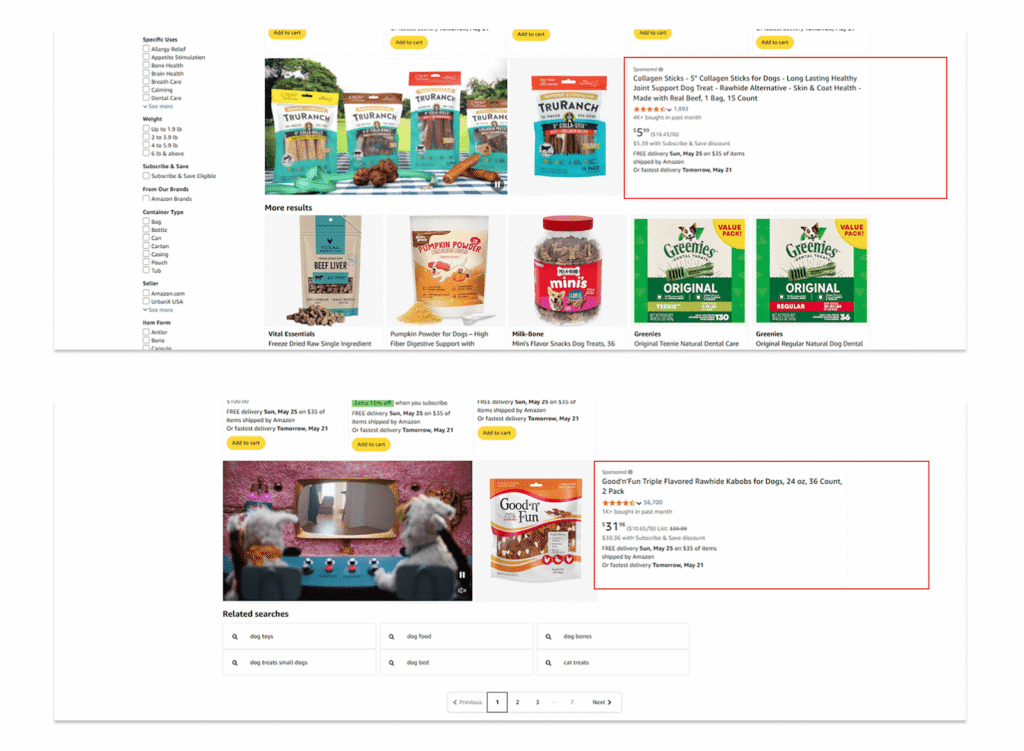
Together, these placements give you multiple ways to get in front of high-intent shoppers, which is the core value of what is Amazon PPC.
Now that you have a feel for how Amazon PPC works behind the scenes, let’s talk about why it actually matters, especially if you’re a new seller trying to get your first real momentum.
Why Amazon PPC Matters for New Sellers?
When most new sellers hear about what is Amazon PPC, they think of it as a way to get more visibility. And yes that’s true.
But there’s a lot more going on behind the scenes.
Amazon PPC isn’t just about driving traffic. For new sellers, it’s a learning tool, a launch strategy, and a competitive advantage that is rolled into one.
And here is why understanding what is Amazon PPC really matters because it helps your products get seen and sold.
1. Gives You Real Customer Data
When you’re starting out, you don’t just need clicks. You need insights.
With PPC, you quickly find out what shoppers are searching for, which keywords actually convert, and what messaging grabs attention.
You see in real time what’s working and what’s not. This data-driven approach is one of the most valuable aspects of what is Amazon PPC for beginners.
That kind of feedback is hard to get anywhere else, especially early on.
2. Helps You Get Sales and Start Ranking
Amazon’s algorithm favors listings that already perform well.
But how do you get those sales if you’re new and buried on page 7?
Here you can use PPC to break the cycle. By driving those first few sales with ads, you start building momentum.
And that momentum can lead to better organic ranking, more visibility, and eventually, more sales without spending on ads 24/7.
3. Generate Sales and Gain Visibility
One of the biggest challenges for new sellers? Getting your first few reviews.
With PPC, you can speed up that process. Those early sales give you a shot at real, honest reviews.
And once you have a handful of them, your conversion rate improves, your ad campaigns become more efficient, and your listing gains trust.
- No reviews = no sales.
- No sales = no reviews.
PPC helps you fix that.
4. Helps You Compete Fairly and Effectively
Some sellers use black-hat tactics to get ahead with fake reviews, keyword manipulation, and all that messy stuff.
You don’t need to play that game. Amazon PPC gives you a clean, reliable, and scalable way to reach customers, earn sales, and build a brand the right way.
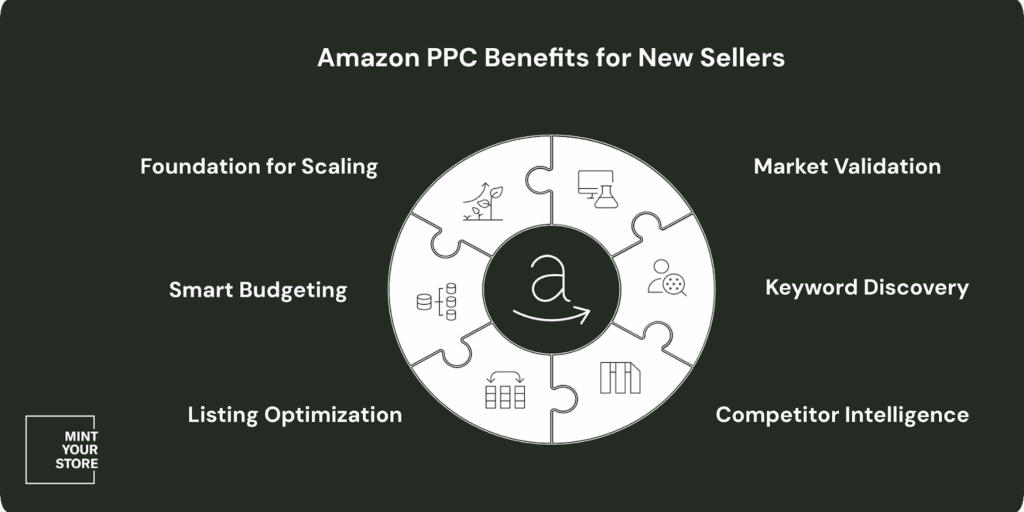
Understanding Amazon PPC isn’t just a marketing tool but a growth engine.
It helps you test, learn, improve, and scale, especially when you are new and need every advantage you can get.
Thus, use it wisely as you’re not just advertising but are building something that lasts.
Types of Amazon PPC Ads
Amazon offers three types of PPC ads, and each one serves a different purpose. Whether you’re just starting out or looking to scale, understanding these Amazon ad types helps you choose the right tool for the right job.
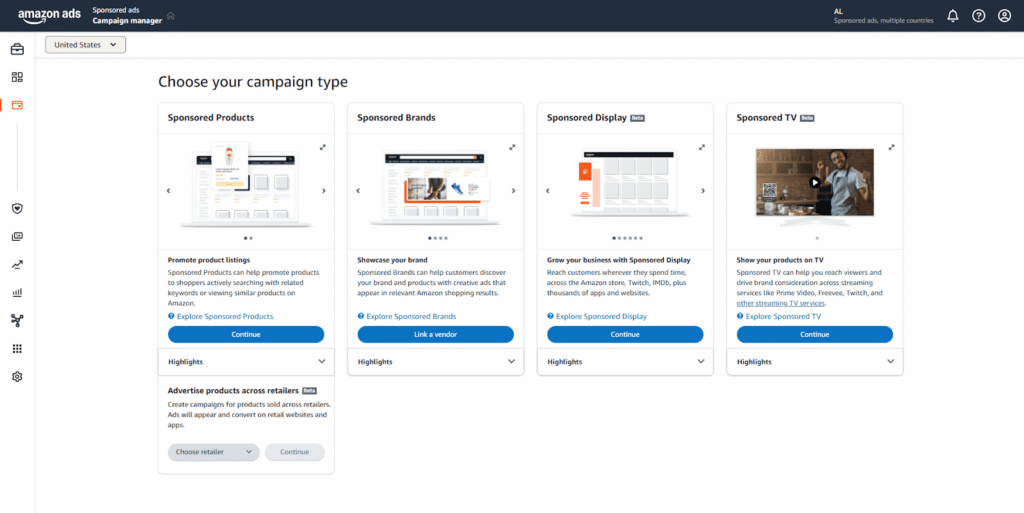
Let’s break them down.
1. Sponsored Products Work Best for New Amazon Sellers
If you’re running your first Amazon ads, start here.
Sponsored Product ads promote individual listings and appear directly in search results or on competitor product pages.
These are the most beginner-friendly ads and often the most effective.
Why does it work?
- Targets high-intent shoppers searching for what you sell
- Blends in with organic listings (looks native)
- Great for testing keywords and driving early sales
Where does it appear?
Search results, product detail pages, and even “Customers also bought” carousels.
When to use?
- Launching a new product
- Trying to win the Buy Box
- Testing which keywords convert best
2. Sponsored Brands For Building Brand Awareness
Once you have a brand registered with Amazon Brand Registry, you unlock access to Sponsored Brand ads.
These ads feature your logo, custom headline, and multiple products in one banner and they show up at the top of search results.
They are perfect for telling your brand story and getting more eyes on your full catalog.
Why does it work?
- Positions your brand as a category leader
- Drives traffic to your Store or custom landing page
- Helps increase branded searches over time
Where does it appear?
Top of search results, sometimes mid-page or bottom, and within the Brand Store.
When to use?
- Promoting multiple products at once
- Creating a more branded experience
- Boosting visibility for your full product line
3. Sponsored Display For Retargeting and Gaining New Customers
Sponsored Display lets you reach shoppers beyond Amazon, including those who visited your product page but didn’t buy.
Think of it as Amazon’s version of retargeting. It’s great for reminding interested customers to come back and complete their purchase.
Why It Works?
- Targets shoppers who have already shown interest
- Shows ads both on and off Amazon (like third-party sites or apps)
- Increases overall brand recall and conversions
Where does it appear?
Product pages, customer review sections, sidebars, and off-Amazon websites.
When to use?
- Retargeting visitors who didn’t convert
- Expanding reach beyond Amazon’s search results
- Supporting high-traffic campaigns for more visibility
Pro Tip: Use Sponsored Products to build traction, Sponsored Brands to grow awareness, and Sponsored Display to stay top-of-mind.
Now that you know Amazon ad types you can run on Amazon and their differences, let’s walk through how to set up your first Sponsored Products campaign step-by-step.
This practical application will solidify your understanding of what is Amazon PPC.
How to Set Up Your First Amazon PPC Campaign?
If you’re new to Amazon advertising, launching your first PPC campaign might sound overwhelming.
But don’t worry, once you understand the basics, it only takes a few minutes to get your first ad live.
Below is a complete beginner-friendly guide, including what you need beforehand, a step-by-step setup process, and common mistakes to avoid.
Checklist: What You Need Before You Start?
Before jumping into building a campaign, make sure you have checked these conditions:
- You have a Seller Central account
- Your product listing is live and buyable
- You have access to the Campaign Manager (under the Advertising menu)
- Ideally, your product is enrolled in FBA (though not required)
- You know your daily ad budget (start small—\$10–\$20/day is fine)
Once you have made sure of these grounds, below are the steps to follow for creating your first Amazon PPC campaign.
This hands-on experience will deepen your understanding of what is Amazon PPC.
Step-by-Step: Create Your First Amazon PPC Campaign (Sponsored Products)
Step 1: Log in to Seller Central
Go to the Advertising tab and click Campaign Manager. Then, hit the “Create campaign” button at the top right.
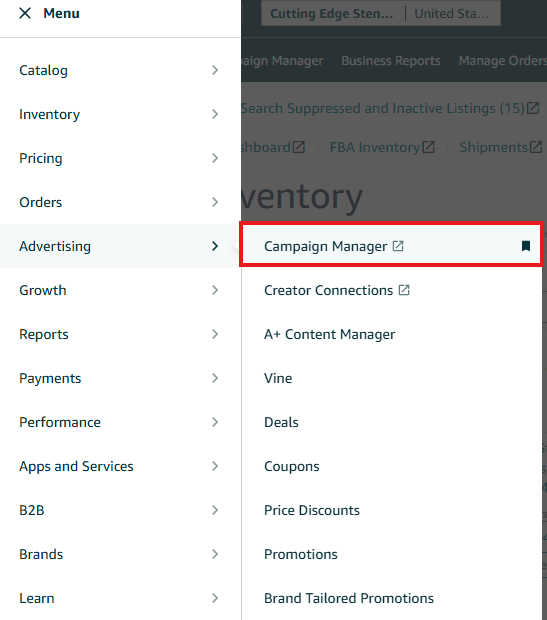
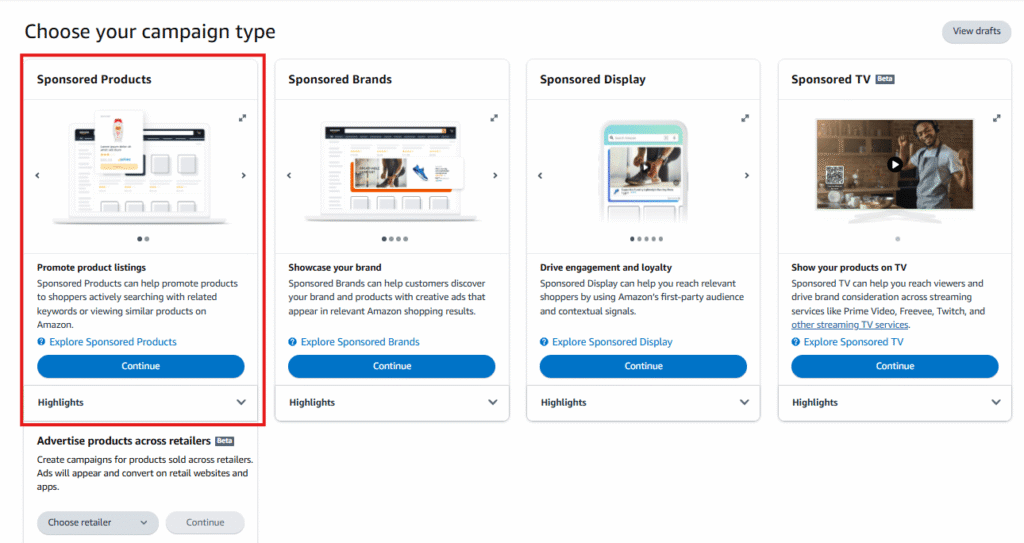
Step 2: Choose Sponsored Products
You’ll see three options: Sponsored Products, Sponsored Brands, and Sponsored Display.
Select “Sponsored Products” and click Continue.
Step 3: Name Your Ad Group
Give your ad group a clear name, like AdGroup_Auto_01, to keep things organized.
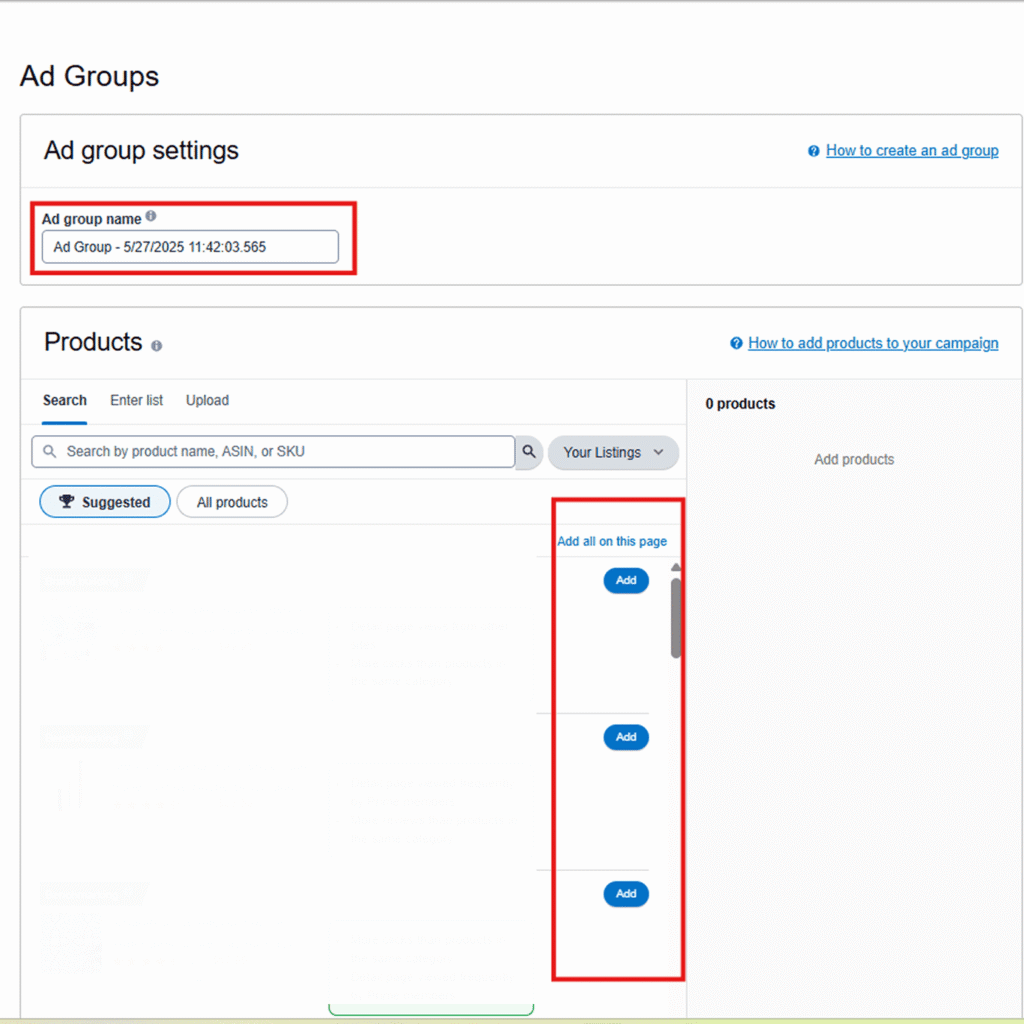
Step 4: Pick the Products to Advertise
Click “Add” next to the ASINs (products) you want to run ads for.
Step 5: Choose Targeting Type
Go with Automatic Targeting if you’re just getting started.
Amazon will handle matching your ads with the right keywords and products.
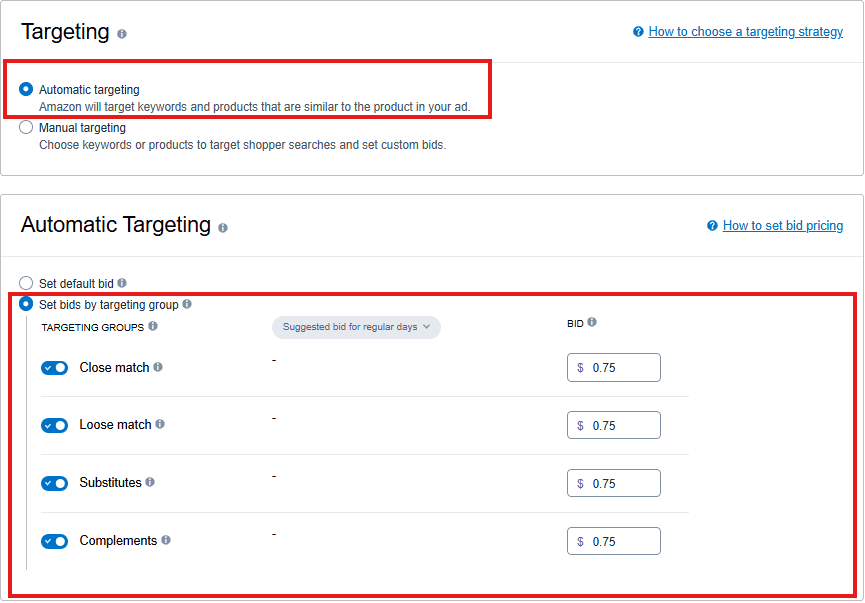
Step 6: Set Bids by Targeting Group
This lets you set different bids for groups like:
- Close Match
- Loose Match
- Substitutes
- Complements
Step 7: Enter Your Bids
Add your bid amounts for each targeting group. Start with moderate bids so you can test what works best.
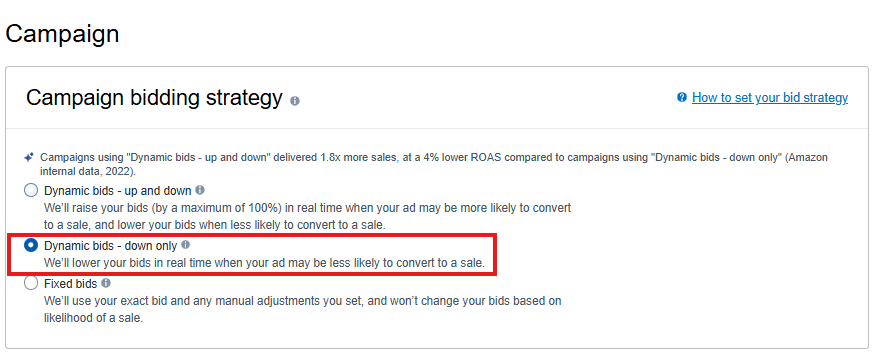
Step 8: Select a Bidding Strategy
Choose “Dynamic bids – down only”.
Amazon will lower your bid when a sale seems less likely, saving you money.
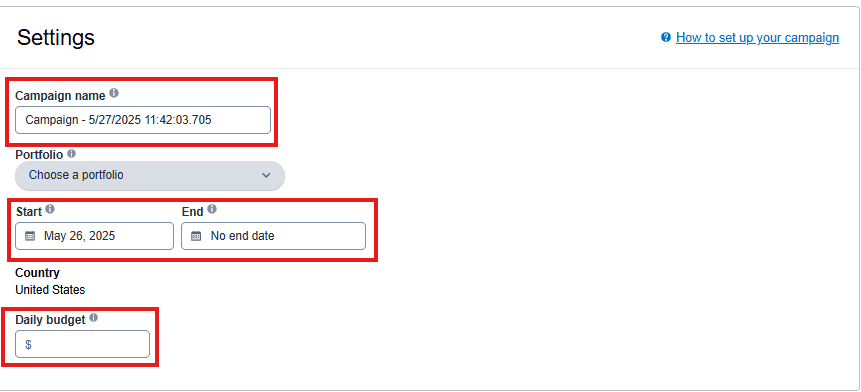
Step 9: Set Campaign Details
Campaign Name: Use a clear name (e.g., SP_Auto_TurkishPoppy)
Start Date: Pick when you want the campaign to go live
End Date (optional): Set if you want it to stop on a certain date
Daily Budget: Enter how much you want to spend per day (e.g., $20)
Step 10: Launch Your Campaign
Review everything, then click “Launch Campaign.”
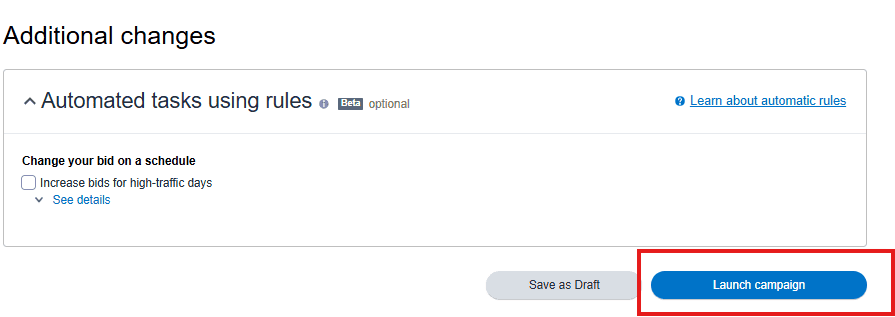
That’s it — your ad is live!
The step-by-step instructions in the Amazon ads for beginners guide make launching your first campaign less challenging.
Now you have a clear, hands-on understanding of what is Amazon PPC and why it matters.
What are the Key Amazon PPC metrics You Need to track?
Running ads is only half the battle, but knowing which numbers actually matter is where real optimization begins.
Amazon PPC gives you a lot of data, but not all metrics are equally useful when you’re trying to understand what is Amazon PPC and how it performs.
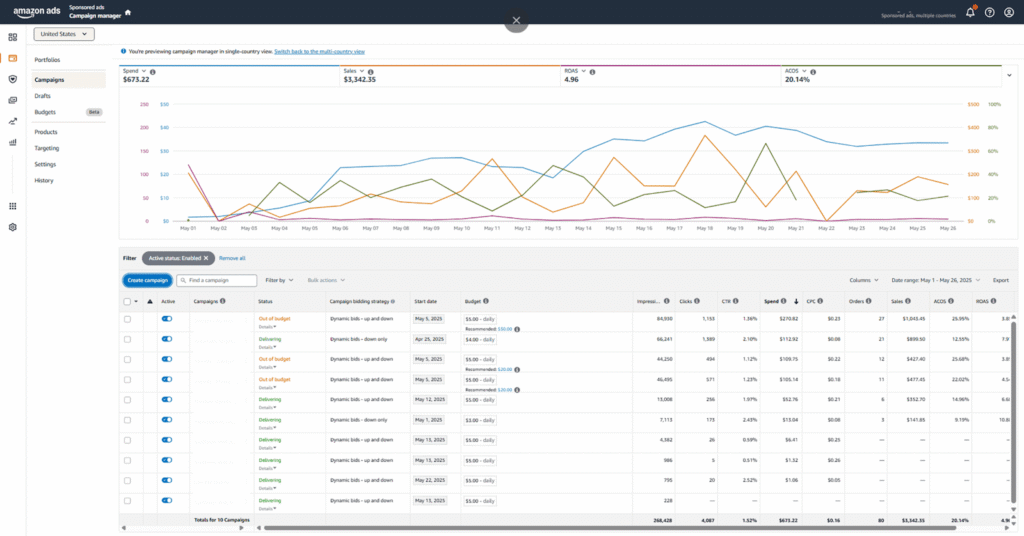
Let’s break down the key metrics you need to track, what they really mean, and how to take action based on them.
- Impressions
The number of times your ad is displayed to shoppers. High impressions indicate good visibility, but if clicks are low, your ad may not be engaging or relevant enough. - Clicks
The total number of times shoppers click on your ad. A high click count shows your ad is attracting attention; a decline may signal the need to adjust your ad copy or targeting. - Click-Through Rate (CTR)
The percentage of impressions that result in clicks. Calculated as (Clicks ÷ Impressions) × 100. A high CTR means your ad is resonating with shoppers; a low CTR suggests you should revisit your keywords, images, or ad messaging. - Cost Per Click (CPC)
The average amount you pay each time someone clicks your ad. High CPCs can eat into your margins, so monitor this closely and adjust bids or target less competitive keywords if needed. - Conversion Rate (CVR)
The percentage of clicks that lead to a sale. Calculated as (Orders ÷ Clicks) × 100. A high conversion rate means your product page is persuasive; a low rate may require optimizing your listing or targeting more relevant keywords. - Advertising Cost of Sales (ACOS)
Shows the efficiency of your ad spend. Calculated as (Ad Spend ÷ Ad Revenue) × 100. A lower ACOS means more efficient spending, but the ideal number depends on your profit margins and goals. - Return on Ad Spend (ROAS)
The inverse of ACOS, calculated as (Ad Revenue ÷ Ad Spend). A higher ROAS indicates better returns from your ads, but sometimes investing in awareness (with a lower ROAS) can help long-term growth.
How to Read Amazon PPC Reports?
There are two goldmines of insight in Seller Central:
Search Term Reports
- They do show the actual search queries that triggered your ads.
- You can use this to find high-performing keywords to promote.
- You can identify irrelevant terms to add as negative keywords.
Placement and Product Reports
- They show how your ads are performing across placements (Top of Search, Rest of Search, Product Pages).
- You can use this data to apply placement bid adjustments based on performance.
Action Tip: Analyze these reports weekly. Add new converting keywords, cut underperforming ones, and adjust bids based on performance.
# Actions to Take Based on Amazon PPC Reports
- Increase bids or budgets for high-performing keywords with strong CTR and conversion rates.
- Lower bids or pause keywords with high CPC and low conversion.
- Optimize product listings if you get clicks but not conversions.
- Test new ad creatives or copy if impressions are deep but CTR is low.
- Use Search Term Reports to add high-performing search terms as keywords and negative keywords to filter out irrelevant traffic.
# Amazon PPC Report
Here’s how to turn your Amazon PPC report data into clear actions, using key metrics to optimize performance and profitability.

By consistently monitoring these metrics and taking data-based actions, you can maximize the effectiveness of your Amazon PPC campaigns, leading to sustainable growth.
5 Amazon PPC Strategies for Beginners
If you’re new to selling on Amazon, running your first PPC (Pay-Per-Click) campaigns can feel intimidating. Many sellers either spend too much too quickly or focus on the wrong keywords.
Below are five essential strategies that will help you launch smarter, get more visibility, and avoid wasting your ad budget.
1. Use Auto and Broad Match Campaigns to Discover What Works
When you launch a new product, you don’t know which keywords your customers are actually using to find it.
That’s why it’s smart to start with Auto and Broad Match campaigns.
Because… Auto campaigns let Amazon show your ads based on what it thinks is relevant. They’re great for keyword discovery.
And…. Broad Match campaigns allow your ads to show for search terms that include your keywords in various combinations.
Example: If your keyword is “yoga mat,” a broad match campaign might show your ad for “non-slip yoga mat” or “best yoga mat for beginners.”
Recommended Setup
- Start with a small daily budget (e.g., $10–$20 per campaign).
- Monitor the Search Term Report to see which keywords generate clicks and sales.
- Add good-performing keywords to a manual campaign (more on that next).
- Add irrelevant search terms as negative keywords to avoid wasting money.
2. Put Winning Keywords into a Manual Exact Match Campaign
Once you know which keywords are working, move them into a separate Manual Exact Match campaign.
An exact match gives you more control because your ad will only show when someone searches for that exact keyword.
This helps improve your ad relevance and often leads to higher conversion rates.
Tip:
- Start by moving only the top 5–10 high-performing keywords into this campaign.
- Keep it focused to avoid spreading impressions too thin.
- Don’t blindly accept Amazon’s suggested bids.
- Start slightly lower and increase only if you’re not getting impressions.
3. Target Competing Products with Product Targeting Ads
One highly effective and often overlooked strategy is Product Targeting. This allows you to place your ads on the product pages of other sellers.
Look for:
- Competitors with fewer than 50 reviews
- Products with poor images or high prices
By targeting weaker listings, you can attract shoppers who are already looking at similar products, but may be more likely to click on yours if it offers better value.
Example: If you sell a baby-safe feeding baby bottle and find a competitor’s listing with just 3 reviews and a higher price, you can target that product directly.
When a shopper lands on that listing, your ad will show up nearby as an alternative.
4. Use Placement Bid Adjustments to Optimize Ad Visibility
Amazon lets you change your bids based on where your ad appears, which is called Placement Adjustment.
Here’s how to use it:
- Top of Search (first page): These spots convert the best. Set a bid adjustment of +100% or more if you see good performance.
- Product Pages: These can work well for product targeting, but only raise bids if you see solid results.
- Rest of Search: Usually lower-performing. Keep adjustments low or at 0%.
This strategy lets you invest more in high-impact placements without overspending across the board.
5. Run a Branded Campaign to Protect Your Name (Even if You’re New)
As your product starts gaining some visibility, shoppers may start searching for your brand name directly.
If you’re not bidding on your own brand name, your competitors can.
Set up a small Exact Match Campaign Targeting:
- Your brand name
- Variations of your product name
This campaign protects your traffic and ensures you don’t lose customers to competing ads when people are specifically searching for you.
Example: If your brand is called “ZenPro Yoga,” you should bid on terms like “ZenPro yoga mat,” “ZenPro fitness gear,” and so on.
Even before you enroll for Amazon’s Brand Registry.
By applying these five beginner-friendly strategies, you can set up your first Amazon PPC campaigns with clarity.
Starting with a solid plan makes a huge difference, and now you’ve got one based on understanding what is Amazon PPC.
But, before you begin, let’s go over some common PPC mistakes and how to avoid them.
Common Mistakes of Amazon PPC Campaigns
Even though Amazon PPC looks simple on the surface but many new sellers fall into traps that can drain budgets and stall progress.
To help you avoid this, we are listing the most common mistakes new sellers tend to make, along with tips on how to sidestep them.
Understanding these pitfalls is crucial when learning what is Amazon PPC.
1. Overbidding on High-Volume Keywords
Many new sellers assume that bidding for the top ad spot will bring the most sales.
But in reality, the #1 sponsored position can be extremely expensive, and not always profitable.
If your product is new or priced higher than competitors, you may end up paying more per click than you can afford.
How to avoid it?
- Don’t chase visibility for the sake of it. Focus on profitable placements, not just top-of-page ads.
- Use dynamic bidding down only to let Amazon reduce your bids when a conversion is unlikely.
Start with lower bids and adjust based on actual performance.
2. Neglecting Negative Keywords
Running Auto or Broad Match campaigns without managing negative keywords leads to wasted money on clicks that will never convert.
Amazon may show your ad for unrelated search terms, and without negatives, you’ll keep paying for poor traffic.
This is a fundamental mistake when understanding what is Amazon PPC.
How to avoid it?
- Regularly check your search term report.
- Add irrelevant or non-converting terms to your negative keyword list.
Never remove converting keywords, even if they look broad. Let the data guide your decisions.
3. Ignoring Campaign Performance Data
One of the most expensive mistakes is launching PPC campaigns and walking away. Amazon PPC isn’t a set-it-and-forget-it system.
Your bids, keywords, and campaign structures need regular adjustments as you collect more data.
How to avoid it?
- Check your campaigns at least once a week, often in the first month.
- Pause or adjust keywords with high spend but low sales.
Double down on high-converting terms by increasing bids slightly or creating exact match campaigns around them.
4. Running Keyword-Stuffed Campaigns
It’s tempting to load up a campaign with dozens of keywords, thinking it’ll increase your reach. But more keywords don’t equal more sales.
As campaigns with too many keywords tend to dilute your budget and stall performance.
How to avoid it?
- Keep it lean by aiming for 5–10 highly relevant keywords per ad group.
- Group similar keywords together for better targeting and control.
- Monitor which terms get impressions, and cut out the dead weight.
5. Treating PPC as a Shortcut to Organic Ranking
There’s a common myth that spending on PPC automatically boosts your organic ranking.
While PPC can help generate sales and visibility, it’s not a replacement for strong listings or a long-term ranking strategy.
How to avoid it?
- Make sure your product detail page is fully optimized: titles, images, bullets, and backend keywords.
- Use PPC to gather real conversion data, then apply those learnings to improve your organic performance.
- Focus on generating consistent sales, both paid and organic, to rise in the search results over time.
Even with the best strategies in place, it’s easy for new sellers to slip up.
Especially when juggling budgets, keywords, and campaign types for the first time.
That’s why it’s just as important to know what not to do.
Getting Started the Right Way
Amazon PPC might feel complicated at first, but it’s one of the most effective ways to get your product noticed and start making sales on Amazon.
The best approach involves launching focused campaigns, watching your data closely, and adjusting based on what you learn. Starting small helps protect your budget while giving you valuable insights into what is Amazon PPC and how it can benefit your business.
Remember, success doesn’t come from just throwing money at every keyword. It’s about managing your budget wisely, choosing the right keywords, and constantly optimizing your campaigns.
This beginner’s guide is created to help you set up your first campaign with confidence and clarity.
But if you think it is too much to manage on your own, we’re here to help.
Want expert eyes on your campaigns? Reach out to Mint Your Store and let’s discuss.
Our team really gets what is Amazon PPC and knows how to get the most out of your budget.
With the right strategies, regular tweaks, and expert support when you need it, your PPC campaigns can become a powerful engine for growth. So don’t wait, let’s get started today!