
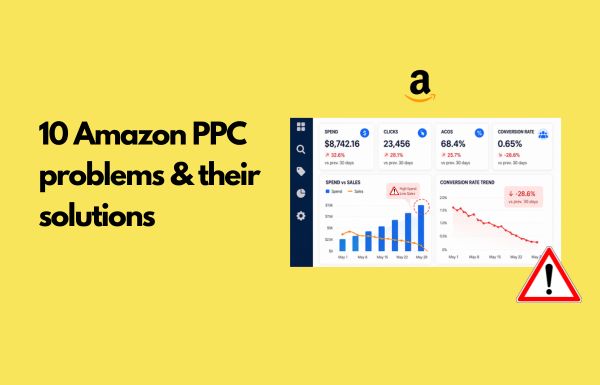
If your Seller Central dashboard shows Amazon PPC ads getting clicks but no sales, you are not alone. It is one of the most common issues we see in Amazon advertising, and a weak conversion rate can quickly drain profit.
In our experience managing Amazon advertising for growing brands, a non-converting ad is rarely due to one bad keyword. It is a symptom of a misaligned system.
When sellers log in and fixate only on their advertising cost of sales (ACOS), they often miss the full buyer journey. Good Amazon PPC management means treating every paid click as a signal the algorithm is watching, not just a line item to optimize.
Here is the part most sellers underrate. When your ads pull traffic but fail to close the sale, you are not only losing margin. You are actually losing your product’s organic visibility too.
So, in this guide, we will walk you through:
- Determine whether your Amazon PPC issue is actually low conversion
- 10 reasons your Amazon PPC campaigns spend but do not sell
- A simple decision tree to analyze PPC performance issues
- Common fixes for underperforming accounts
TL;DR: When amazon ppc spends without selling, the problem is rarely your keywords alone. It is usually a mix of wrong search intent, a detail page that does not answer the shopper, a weak offer, or other sellers winning the click after you paid for it. Fix the listing and offer first, then clean up your campaign structure, then adjust bids. That order matters.
Check the Amazon PPC Numbers Before assuming it’s an ads problem
Before you pause a single keyword in Seller Central, figure out which problem you actually have. Three very different issues are often mistaken for “Amazon PPC not working,” and each needs a different fix.
| What you see | What it really is | Where to look first |
| No impressions | Bid or relevance issue | High bids, match type, daily budget |
| Impressions but no clicks | Creative or price issue | Main image, price, rating |
| Clicks but no sales | Conversion issue | Detail page, offer, competition |
Compare your PPC conversion rate against the rate on your organic sales. If your organic traffic converts fine but PPC does not, your traffic quality is off. If both organic and PPC traffic convert poorly, look beyond the ads and review the product detail page, pricing, and offer to see where the conversion experience can be improved.
One thing that has changed in 2026 makes this important. Amazon’s ranking increasingly rewards listings that convert, so a campaign pushes lots of clicks that do not turn into sales, which can actually drag down your organic rank. Non-converting Amazon PPC ads are no longer a contained problem.
They leak into your organic performance too, which is one more reason to fix conversion before you scale spend.
The following 10 reasons provide a practical framework for diagnosing where your Amazon PPC performance is breaking down and the best way to fix it.
Quick overview: 10 reasons Amazon PPC clicks do not convert
Here’s a quick look at the 10 issues that can hurt Amazon PPC performance, along with the fix and KPI to watch.
| No | Reason | How to Fix It | KPI to watch |
| 1 | Wrong search intent | Tighten keyword relevance | Conversion Rate (CVR), Search Term Report |
| 2 | Browsers, not buyers | Split research vs ready-to-buy terms | CVR, ACoS |
| 3 | Listing misses the query | Move key benefits above the fold | Session Conversion Rate |
| 4 | Weak reviews or price | Build proof, test price before scaling | Star Rating, Review Count |
| 5 | Plain offer | Add bundles, savings, guarantees | Coupon Redemption, CVR |
| 6 | Competitors on your page | Defensive targeting and badges | Brand Share, Detail Page Sales |
| 7 | Buy Box or shipping friction | Stabilize the Buy Box and delivery | Buy Box %, Delivery Promise |
| 8 | Messy campaign structure | Isolate winners into focused campaigns | ACoS, ROAS |
| 9 | Flat bids across intent | Tier bids and add negatives | CPC, ACoS, ROAS |
| 10 | Acting on thin data | Set minimum data thresholds | Clicks, Orders, Statistical Significance |
Now let’s look at each issue in detail, including what causes it and how to fix it.
10 Reasons Your Amazon PPC Ads Are Not Converting
Every click on your Amazon PPC ads is a potential customer, but clicks alone don’t guarantee sales. If your campaigns are getting traffic without conversions, the issue usually lies beyond the ads themselves. Here is the most common reason Amazon PPC ads fail to convert and practical fixes to improve them.
Reason 1: Keywords Target the Wrong Search Intent
A keyword can look relevant to your product but still attract shoppers looking for something different.
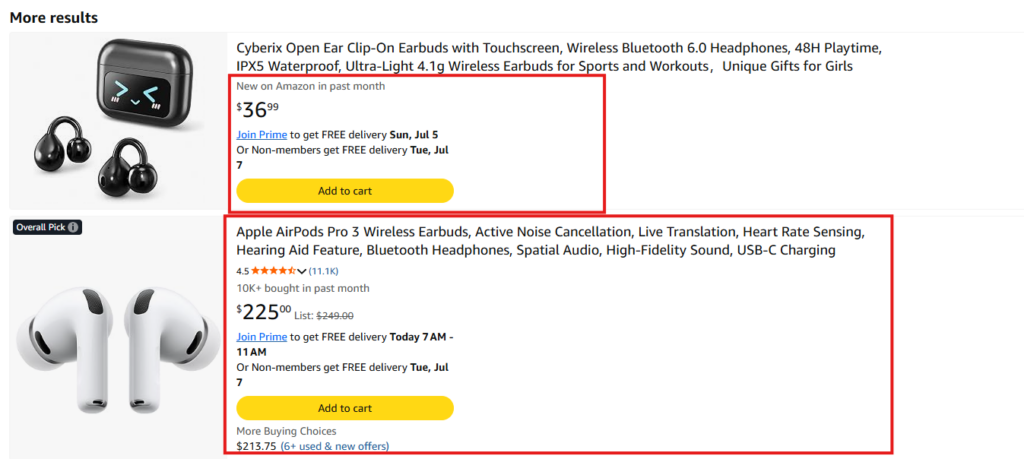
For example, you are selling mid-range wireless earbuds and bidding on a term like “premium noise-canceling earbuds.” Some shoppers using that term may be looking for high-end models with advanced ANC, premium audio features, or a higher price point. They click your ad, realize the product does not match what they had in mind, and leave without buying.
Nothing is necessarily wrong with the product or the ad. The issue is that the shopper’s intent does not fully match the offer, which can lead to clicks that are unlikely to convert.
Here is a quick way to test it.
- Search your main target keyword on Amazon and review the top organic results. If most results differ significantly from your product in price, features, use case, or positioning, the keyword may be attracting a different type of shopper.
- Refine your keyword research, remove overly broad or poorly matched terms, and prioritize more specific long-tail phrases that accurately describe your product.
If the same keywords also underperform organically, review your Amazon SEO to make sure the listing matches what shoppers are looking for.
Amazon’s COSMO system considers what shoppers are actually looking for, not just the exact words they type. Your listing should therefore align with that intent and clearly show why your product is the right fit for the search, rather than simply repeating keywords.
Reason 2: Amazon PPC Ads attract shoppers who are not ready to buy
A high click-through rate with a low conversion rate is a specific signal. Your ad is a great hook, but it is pointed at people who are not ready to buy.
This usually comes from broad match targeting that hasn’t been refined, an automatic campaign left on aggressive, or top-of-funnel keywords running on a bottom-of-funnel product.
The shopper searching for “how to whiten teeth” is still in the research phase. The one searching for “whitening strips 28 count” has much stronger purchase intent. They should not be sharing the same bidding strategy.
Split your research terms from your ready-to-buy terms, then assign them differently, leaning on exact-match keywords for the buyers. Prioritize your advertising budget to the search terms that signal purchase.
Tip: If you’re still unsure how match types and campaign types work, our complete beginner’s guide to Amazon PPC breaks down automatic campaigns, manual campaigns, and how to structure by intent from scratch.
Reason 3: Product Pages Do Not Answer the Shopper’s Question
Your ad did its job by earning the click. Now your product detail page has to convince the shopper to buy and that’s where many listings fall short.
If the shopper cannot see the answer to their main question above the fold, they scroll, hesitate, and bounce. A shopper’s attention span is short, and missing details like size, material, compatibility, or use case quietly kill conversions.
Try this.
For your highest-spend keyword, write down the top three questions a shopper has before buying. Now open your listing on a phone. Do your title, main image, and first two bullet points answer all three without scrolling?
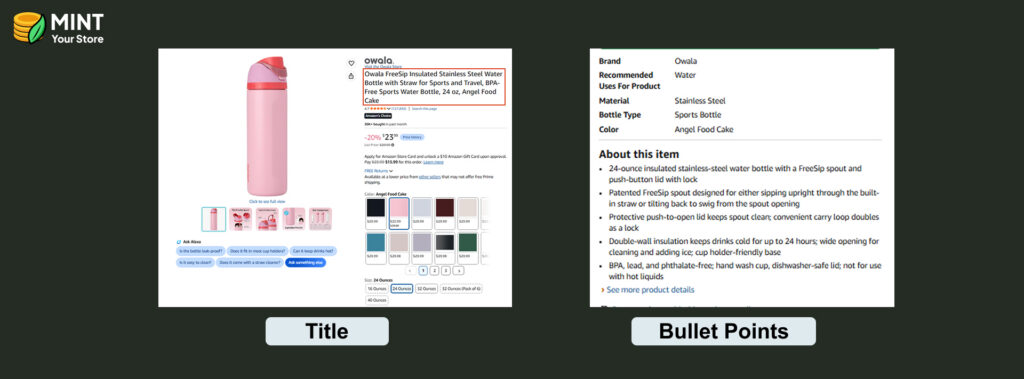
If not, reorder your content, sharpen your product images, and pull the keyword-aligned benefits up top to hold the customer’s attention.
This is exactly what proper Amazon product listing optimization is for, and strong A+ content answers the rest visually further down the product pages.
Two details make this reason bigger than it used to be.
- First, most of your traffic is on mobile, where titles truncate around 80 characters and bullets collapse, so anything important sitting past that cutoff may as well not exist.
- Second, Amazon’s AI assistant Rufus now reads your full listing to answer shopper questions and decide whether to recommend you.
If your listing does not clearly answer common questions, Rufus quietly leaves you out of the conversation.
Tip: Ask Rufus a question a real buyer would ask about your product and see if it recommends you. If it does not, your detail page is not answering the query.
Reason 4: Reviews or Pricing Do Not Match Your Position
You can win the click and still lose the sale on the detail page.
If your rating is 3.9 stars next to competitors at 4.6, or your price sits well outside the category norm, buyers land, compare, and defect to other sellers. The ad looked great, but the offer did not hold up.
What we usually recommend here is simple. Pause heavy spend on your weakest SKUs, build reviews, and run a price test before you scale. Amazon advertising can bring more shoppers to your listing, but it cannot make a bad listing sell.
Pouring ad spend on a weak listing just drives up your advertising cost without improving your sales.
Rufus reads your reviews and surfaces the themes in them, so a pattern of complaints about sizing or durability can follow you right into the AI’s recommendation, not just your star rating.
And Amazon watches your price against the wider market, so a price that looks high next to the same item elsewhere can suppress both conversion and visibility.
Fix the recurring review complaints and check your price parity before assuming your PPC campaign is the problem.
Reason 5: The Offer Is Too Weak to Win the Click
Sometimes the product is genuinely fine and still does not feel like a good deal.
No bundle, no clear savings, a confusing variation setup, and no reason to pick you over the near-identical listing next door. Shoppers do not need much to tip toward one of the many sellers competing for the same click.
Strengthen the perceived value first. Add a bundle, show the savings clearly, include a simple guarantee. Then re-test your PPC campaigns. A better offer lifts the conversion rate on every keyword at once, which beats chasing bid tweaks on a flat product and can genuinely increase sales velocity.
A well-built Amazon storefront helps with optimization, since it lets shoppers browse your multiple products and pick the bundle that fits.
Reason 6: Competitors Distract Shoppers on the Product Page
Getting the shopper to your product page is only part of the job. Once they arrive, competitor ads, sponsored placements, and “Products related to this item” recommendations can pull their attention toward another ASIN.
You may see strong engagement on the page but still lose the sale when shoppers click through to competing products. In other words, the ad did its job, but the product page did not keep the shopper focused on your offer.
Strengthen your presence on the product page by using product targeting on your own ASINs where it makes sense. Sponsored Display, video, and other relevant ad formats can also help reinforce your brand presence. At the same time, make sure your main image, Prime eligibility, coupons, pricing, and other offer elements give shoppers a strong reason to stay.
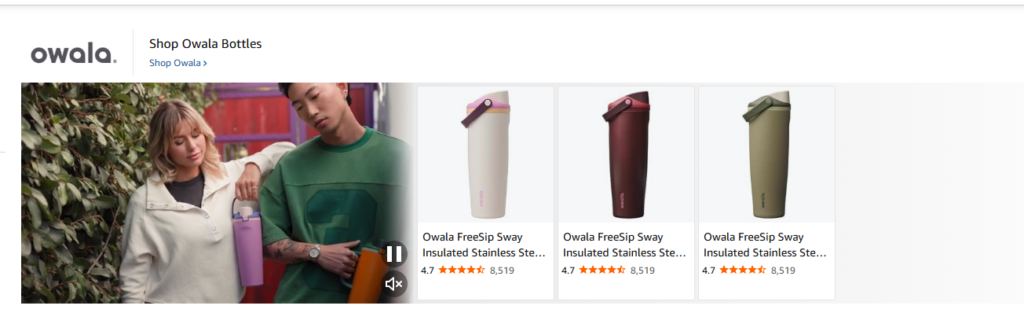
If shoppers leave without purchasing, Amazon DSP retargeting can help you reconnect with them later and bring qualified shoppers back into the purchase journey.
Did you know: Sponsored placements now show up inside Rufus conversations too, so competitors can appear right where a shopper is asking the AI for a recommendation.
Reason 7: Buy Box Loss or Shipping Friction Blocks the Sales
You can send perfect traffic to an offer that simply cannot close.
If you are not holding the Buy Box reliably, or your shipping speed falls behind on a listing with multiple products and sellers, the conversion breaks at the final step. The traffic is fine, but the fulfillment is not.
Stabilize your Buy Box eligibility, keep inventory stocked, and tighten delivery speed before you push more budget.
No amount of bid optimization fixes a listing that loses the Buy Box half the time. Buy Box eligibility is also tied to your broader account health score, so if that has slipped, day-to-day account management is worth sorting out first.
Reason 8: High-Converting and Weak Keywords Are Grouped Together
When one ad group blends your best-converting keywords with a pile of weak ones, two things can happen.
Your advertising budget gets allocated toward underperforming campaigns, and your reports become harder to interpret, making it difficult to identify what is actually driving results.
This is one of the fastest wins we find in a new account. In campaign manager, pull your proven keywords and ASINs into focused manual campaigns, or different campaigns entirely, each with its own daily budget and bids.
A clean campaign structure helps you increase spend on converting keywords and reduce spend on poor-performing ones.
Reason 9: Bids Ignore Intent and Create Wasted Spend
Bidding the same on branded, generic, competitor, and exploratory terms means you overpay for low-intent traffic and underfund the search terms that actually convert.
Tier your bids by intent and by what your performance metrics already show, then add negative keywords to block the dead-end queries and cut the wasted spend.
| Keyword type | Example | Intent | Starting bid | Why |
| Branded exact | “[Brand] water bottle” | Highest | $1.00 | Strong brand intent |
| High-intent generic | “32 oz insulated bottle” | High | $0.70 | Specific product intent |
| Competitor | “[Competitor] bottle” | Medium | $0.50 | Harder to convert |
| Exploratory broad | “water bottle” | Low | $0.40 | Broad discovery traffic |
How to read the bids?
If $1.00 is your baseline bid, the other bids are reduced based on intent. Adjust them using actual ACoS, ROAS, conversion rate, and margin.
These figures are illustrative starting points, not Amazon benchmarks. Once you have enough data, adjust bids based on actual performance, including:
- Conversion rate
- CPC
- ACoS / ROAS
- Margin
- Campaign goals
Don’t rely on intent alone. Add negative keywords when irrelevant or consistently unproductive search terms are consuming spend.
Search intent is only part of PPC. The timing of your conversions can also influence how efficiently your budget is spent.
If your product converts better during certain hours but your daily budget runs out earlier on lower-value clicks, you may be missing higher-value traffic later in the day.
Where your campaign setup and data support it, adjusting spend around dayparting can help stretch the budget for times when shoppers are more likely to convert.
Reason 10: Bid Decisions Are Made Too Early
Making frequent bid changes without enough performance data can lead to poor optimization decisions.
Early results can be misleading, especially for low-volume products or newly launched campaigns where search volume and conversions take time to accumulate.
Set a minimum threshold before you act, measured in clicks or spend money against your target ACOS.
Learn to calculate ACOS correctly, as it helps you evaluate keyword profitability using real performance data. Since your advertising cost of sales is calculated as ad spend divided by ad revenue, it provides a clear view of whether your advertising investment is generating the desired return.
Then write simple rules for when to pause, when to lower a bid, and when to keep waiting. Giving campaigns enough time to generate reliable insights helps the sponsored products that just need time to prove themselves.
A decision tree to diagnose clicks without sales
When your Amazon PPC campaigns spend without selling, walk through these in order and stop at the first “no.” That is where you need fixes.
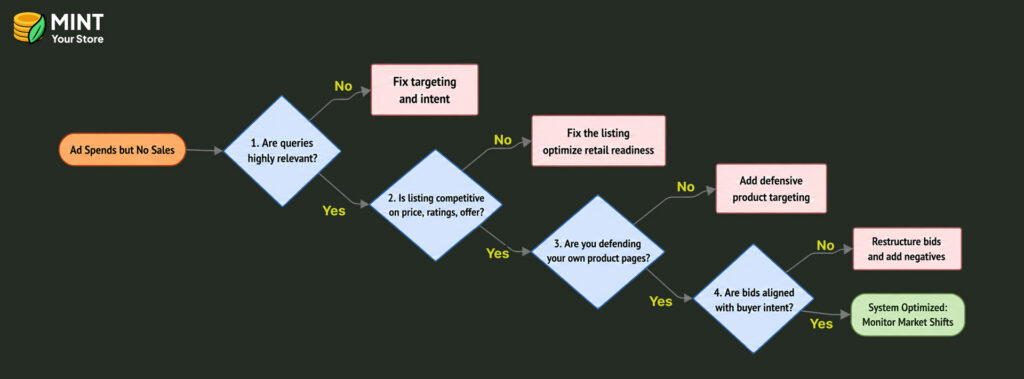
This order helps you avoid changing bids when the actual problem is somewhere earlier. We use the same process when auditing an account because adjusting bids on a listing that does not convert will only waste money faster.
Next step
Amazon ads that generate clicks without producing sales are one of the biggest challenges for e-commerce brands because they can quietly reduce profitability while providing little return.
But as we have walked through, a low conversion rate is a diagnosable chain, running from the search intent behind the click all the way to the listing, the offer, and the other sellers on your own page.
The “set it and forget it” era is over. The sellers winning right now write listings that answer real buyer questions for both shoppers and Amazon’s AI, structure their ad campaigns around buyer intent instead of raw keyword volume, and pace budget toward the hours buyers actually convert.
If your impressions are up and your clicks are climbing but revenue is flat, stop guessing and start diagnosing.
Need help improving your Amazon PPC performance? Get in touch with Mint Your Store today for expert Amazon PPC guidance.
FAQs
1. Why am I getting clicks but no conversions on Amazon?
Clicks without conversions usually mean the traffic and product page are mismatched. Common causes include weak keyword intent, poor listing content, uncompetitive pricing, weak reviews, or buying friction such as stock issues or a missing Buy Box.
2. How do I turn Amazon PPC clicks into sales?
Turn Amazon PPC clicks into sales by focusing on matching ad intent with the listing, improving the main image, title, bullets, price, and reviews. Then refine targeting, add negative keywords, and send traffic only to high-converting, purchase-ready search terms.
3. Why do I have a lot of impressions but no clicks?
Deep impressions with no clicks usually point to weak ad relevance or low appeal. The main image, title, price, review count, and offer may not stand out enough against competing listings in search results.
4. How do I calculate ACoS on Amazon?
Calculate ACoS by dividing ad spend by ad sales, then multiplying by 100. For example, if you spend $50 and generate $200 in sales, your ACoS is 25%.
5. What should I expect when switching to an Amazon PPC agency after years of DIY?
Expect a transition period for account audits, data review, and campaign restructuring. Mint Your Store can help improve organization, targeting, reporting, and efficiency, but results usually take time, not an immediate overnight jump.